⚔MU Online guide
Classes, stats, levelling, items, commands and keys: the basics of MU.
Getting started
- Create an account on this website (Register), then press Play. The game runs in your browser: nothing to install.
- Make a character, choose its class and enter the world. New characters start in their class's town.
- Fight monsters to gain experience. Each level gives you points to put into your stats.
Play on a phone? See the phone controls guide.
The classes
- Dark Knight: a strong melee fighter (Strength, Agility, Vitality). Starts in Lorencia.
- Dark Wizard: powerful magic from a distance (Energy). Starts in Lorencia.
- Fairy Elf: a bow fighter who can also heal and buff the party (Agility, Energy). Starts in Noria.
- Magic Gladiator: a mix of sword and magic (Strength or Energy). Starts in Lorencia.
- Dark Lord: fights with a pet and commands the party (Strength, Command). Starts in Lorencia.
- Summoner: curses and summoned powers (Energy). Starts in Elbeland.
- Rage Fighter: fast fist combos (Strength, Vitality). Starts in Lorencia.
Stats
- Strength: physical damage, and needed for heavy weapons and armour.
- Agility: defence, attack speed and accuracy; important for elves and archers.
- Vitality: life (HP).
- Energy: mana and magic damage; the wizard's main stat.
- Command: only for Dark Lords, for their pets and party skills.
Open the character window (C) and press + next to a stat: a window asks how many points to add (type a number, or +10 / +100 / +1000 / All). You can also type /add str 100 (or agi, vit, ene, cmd).
A stat can go up to 32,767.
Every item shows what it needs (level, Strength, Agility...); in red when you don't have enough.
Where to level
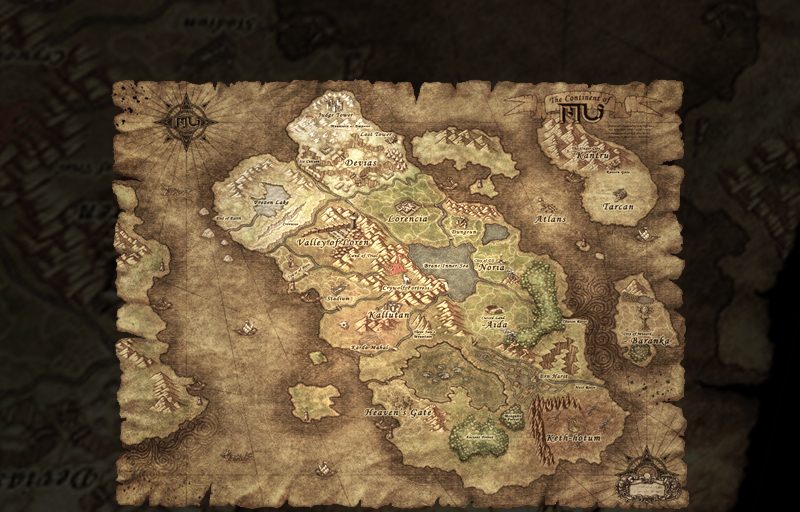
- The newest list, with how busy each map is now: Where to level (in the Guide).
- Level 1–15: around your start town (Lorencia, Noria or Elbeland).
- Level 15–50: Devias, Dungeon, Lost Tower.
- Level 50–150: Atlans, Tarkan, Icarus.
- Level 150 and up: Aida, Kanturu, Raklion and the other high maps.
The move menu (M) or /move <map> takes you to a map; some maps need a minimum level.
Items and jewels
- Normal items can be upgraded from +0 to +15. The higher the level, the stronger the item, and the more Strength or Agility it needs.
- Jewel of Bless: +1 (up to +6). Jewel of Soul: +1 more (up to +9, it can fail). Jewel of Life: adds an option.
- Jewel of Chaos: used by the Chaos Goblin to mix items (wings, higher levels).
- Excellent items (green names) have extra options; Ancient items belong to sets with set bonuses.
- Q, W, E and R are quick slots: drag potions onto them and press the key to drink.
Playing together
- Party: Alt + right-click another player (on a phone: long press) and choose Party. Experience is shared.
- Trade: the same menu, Trade. Check both sides before you accept.
- Guilds: talk to the Guild Master NPC in Devias to make one. You need 10 resets to make a guild; anyone can join one.
- Events (Blood Castle, Devil Square, Chaos Castle...) open at set times: see the Events page.
Keys on a computer
- Left click: walk, attack, pick up, talk to NPCs. Right click: use the selected skill.
- I or V: inventory. C: character and stats. Tab: map. M: move menu. Z: MU Helper.
- The map (Tab) shows where the monsters are: every red dot is a group of monsters. Hold the pointer over a dot (on a phone, tap it) to see the monster's name and level. Drag the map to look around. Golden monsters and the bosses are not shown: those you have to find.
- 1–5: skill shortcuts. Choose a skill, then press Ctrl + the number to put it there.
- Space: pick up items. Alt: show item names on the ground. Enter: chat.
- Alt + right click on a player: trade, party, guild, whisper.
Chat commands
- /add str 100: add points to a stat (str, agi, vit, ene, cmd; up to 65,535 at a time).
- /move <map>: go to a map, e.g. /move devias.
- /reset: reset your character (see SilkMU features). /resetinfo: what the next reset needs.
- /post <message>: a message to everyone on the server.
- /pkclear: clear your killer status (costs zen).
- /offlevel: keep hunting with MU Helper after you close the game (AFK). /offshop: keep your open personal store open after you leave.
← All guides · Updated: 2026-11-10